


Cloud: Android
Sincronizzare con Android
Client
Sincronizzazione file, contatti e calendari possibile tramite il client ufficiale per Android, disponibile su Google Play e F-droid.
Documenti
Per editare i file sul cloud, potete utilizzare WPS Office.
Installatelo dal vostro app store preferito.
Selezionare Apri, quindi in Posizione cliccare su Aggiungi e su Aggiungi WebDAV/FTP.
In URL inserite https://jollacommunity.it/cloud/remote.php/dav/files/nomeutente
Dove, al posto di nomutente, andrà il vostro nome utente, quindi cliccate su OK.
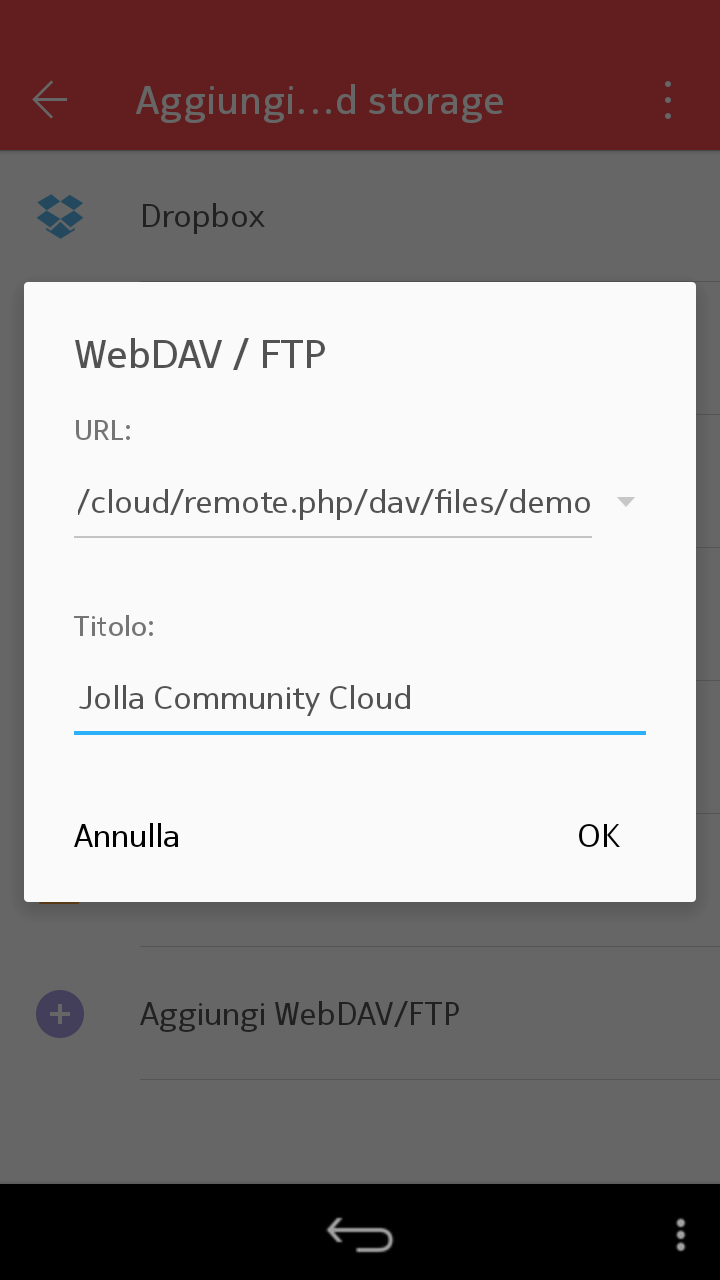
Nella finestra che si aprirà, digitate ancora una volta il vostro nome utente e la password, quindi cliccate su Login.


News
Disponibile ownCloud News su Google Play e F-droid e OCReader su F-droid.
Note
Disponibile MyOwnNotes su Google Play e F-droid.
Impegni
Disponibile OpenTasks su Google Play.
Sync with Android
Client
You can sync files, contacts and calendars with the official client, available on Google Play and F-droid.
Documents
You can use WPS Office to view and edit your documents on the cloud.
Download and install it from your favorite app store.
Select Open, then in Position click on Add and Add WebDAV/FTP.
In URL type https://jollacommunity.it/cloud/remote.php/dav/files/username
Replacing username with your actual user name, then click on OK.
Type once again your user name and your password, then click on Login.
News
You can browse your favorite news by using ownCloud News, available on Google Play and F-droid or OCReader, available on F-droid.
Notes
You can access to your notes by using MyOwnNotes, available on Google Play and F-droid.
Tasks
You can view, add and sync your tasks by using OpenTasks, available on Google Play.


